
The customer problem
Samsung customers weren’t using Samsung’s own sharing features. In an internal survey by our carrier UX team, Samsung’s sharing features didn’t rank in the top five ways people shared content. Apple’s AirDrop ranked first. I led the research to find out why, and which pain points kept people away.
On iPhone, most people share photos, videos, and files with AirDrop. At the time of this study, Android and Samsung phones had two features that did the same job: Google’s Nearby Share and Samsung’s Quick Share. Few customers knew either one existed. (In 2024, Google and Samsung merged the two under the Quick Share name.)



Challenge
Early on, we found customers couldn’t tell which sharing feature worked with which devices. We built a device compatibility matrix and used it to explain the features to participants before each session.

Feature flow
We started with an audit of Samsung’s sharing experience and mapped the flow for four features (Quick Share, Nearby Share, Link Sharing, and Private Share) from opening the share sheet to a completed share.

User surveys
We ran two surveys with more than 100 Samsung users to learn how people shared content: a short screener for recruiting, then a longer survey on sharing habits. The questions covered what might affect sharing: who people shared with, their age, how well they knew the features, and their connection type. We used the results to define user segments and recruit for interviews and usability tests.

User segments
We split participants into two segments by whether they knew the sharing features. People who knew them formed one segment. People who didn’t, we split three ways by the phones their friends and family used: mostly Android, mostly iPhone, or an even mix. Those groups decided whether a sharing feature could work for them at all.

User interviews
We ran 15 remote sessions over Webex during COVID-19 restrictions, asking how people shared content and what they thought of Samsung’s sharing features. Samsung’s security policy didn’t allow recording, so the other designer and I took turns moderating and taking notes.
Usability testing
In the same 15 sessions, participants walked us through how they usually share content and gave feedback on the share sheet. If they hadn’t used Quick Share or Nearby Share, we demonstrated it first, then watched them try it.

Analysis
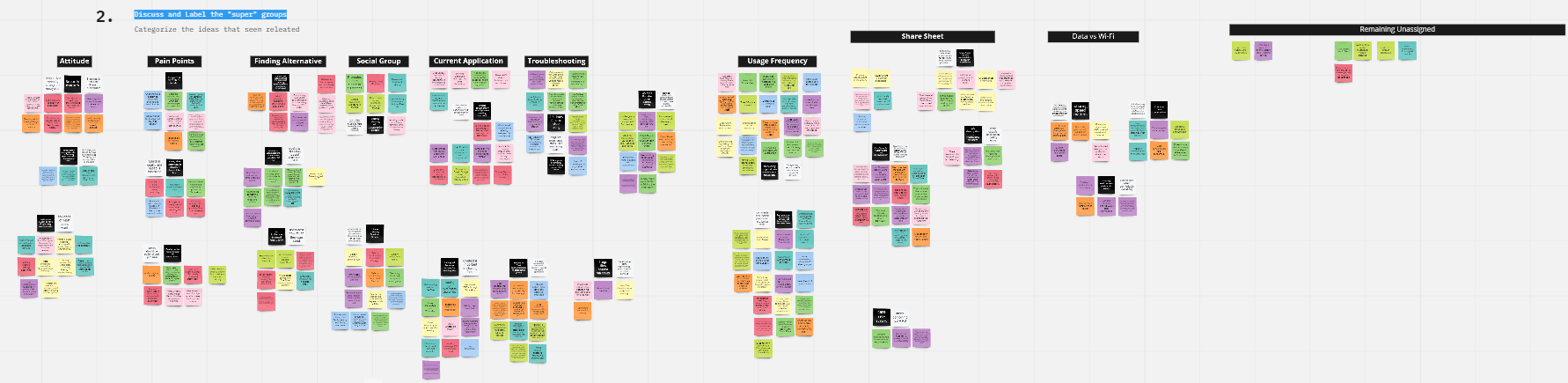
We combined survey data and interview notes into an affinity map and grouped them into themes and pain points.
Patterns and trends
The affinity map produced six findings, which became the basis of our report.
Discoverability
People didn’t notice the sharing features when they opened the share sheet.
Familiarity
Many people didn’t know how the features worked, so they didn’t try them.
Technical challenges
Some people couldn’t use the features for reasons outside their control: transfers failed or devices didn’t show up, Bluetooth or location was turned off, or their phone or the recipient’s was too old.
Overwhelming options
The share sheet offered too many options, so people defaulted to what they already used: messaging apps, email, and cloud links.
Social groups
The features only worked between certain devices, so people whose friends and family used iPhones had no reason to use them.
Location and data
People used the features only when a compatible device was nearby, and many waited for Wi-Fi because they worried about using mobile data.
Results, report, and readout
I presented the findings and recommendations to the UX team, senior leadership, and Samsung’s headquarters in Korea. We recommended three changes: make Quick Share easier to spot in the share sheet, show which devices each feature works with, and cut or group the share sheet’s options. Headquarters acted on the recommendations, and the findings fed into the One UI 4.0 share-sheet redesign. The details are under NDA.
Samsung’s NDA covers the report and any related designs, so they aren’t shown here.


Learnings and reflections
Learnings
People share with whatever is familiar and already in front of them. A better feature loses if it’s harder to find or doesn’t work with the people they’re sharing with.
As a researcher, I learned to segment by the people someone shares with, not only by who they are. The same person had a very different experience depending on their friends’ phones.
Reflections
This was one of my first projects at Samsung. If I did it again, I’d push to test a redesigned share sheet, not only the current one, and set up a way to measure usage after the One UI 4.0 update.