
Project context
In June 2022, Google began requiring apps on the Play Store to use Google Play Billing for digital purchases, including subscriptions. Many apps, Prime among them, removed in-app sign-up and sent customers to the web instead.
In Q4 2022, Prime adopted Google Play Billing and enabled subscription sign-ups directly within the mShop app using Google Play’s subscription management service. Since then, Prime has continued to evolve this acquisition experience, expanding it to additional sign-up touchpoints across the mShop app throughout 2023.

Design process

Challenges
Google’s sign-up sheet now appeared in the middle of an Amazon purchase. Customers would see Google Play inside the Amazon app, and we had to tell them why without slowing them down. Successfully addressing this challenge demanded close collaboration across multiple teams, including Google, Legal, UX Writing, Checkout, Prime UX, and Product, to ensure alignment, compliance, and a seamless customer experience.
Objectives
Checkout
Design Prime sign-up with Google Play Billing inside checkout in the Amazon Shopping app, for Android customers who aren’t Prime members.
Prime page
Redesign sign-up on the Prime page, which already used Google Play Billing, to add User Choice Billing: a Google pilot that lets customers pay through Google Play or through the app’s own payment system.
User flow
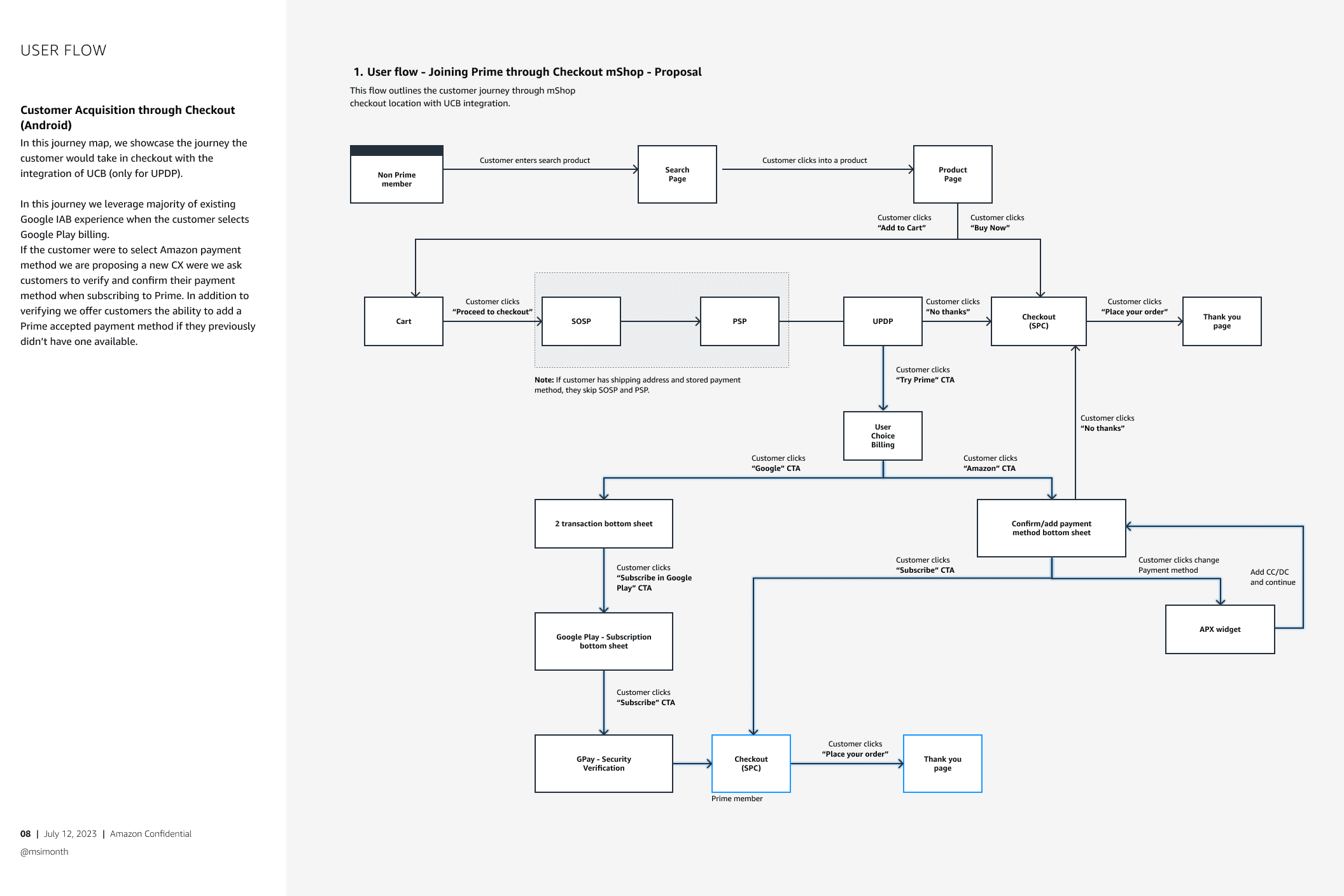
I mapped sign-up from checkout and from the Prime page, along with the existing flows the new steps would touch. The maps showed my partners where customers make decisions and which pages they pass through to finish.
Within the discovery phase, it’s critical that we define the existing experience from predefined locations and any similar flows or patterns that the new experience might impact.


Lo-fi design flows
I turned each step of the map into a low-fidelity screen. My partners and I marked up where a screen was missing context and where customers needed an extra screen before Google Play appeared.

Explaining Google Play
The hardest design problem was explaining Google Play inside an Amazon purchase. Customers needed to know what they’d see, why Google Play was in the Amazon app, and what it meant for their membership, without dropping out of checkout. The flow had to make two things clear:
Prime sign-up goes through Google Play Billing, not Amazon’s usual Prime billing.
After confirming with Google Play, customers return to their cart and pay for their order with their usual Amazon payment method.
Usability study
Stakeholders disagreed on where to explain it: on the existing UPDP, or on a new screen between checkout and Google Play.
I designed both versions, and our UX researcher ran an unmoderated usability study to compare them. The question was which one told customers what they needed without getting in the way of checkout.

Study results
The study settled the debate. It also showed gaps in what we were telling customers.
Key results:
A separate screen before Google Play was the clearest way to explain it.
The extra screen didn’t stop participants who meant to join Prime.
Some participants asked why Google Play was involved at all, so the copy needed to say why.
No participants raised concerns about Google Play managing their subscription.


User Choice Billing on the Prime page
After Google Play Billing launched on the Prime page, Prime joined Google’s User Choice Billing pilot. Google defined most of the flow. I found the places where its rules let us add our own explanation.
The goal was to help customers choose between Google Play and their Amazon payment method, knowing what each choice meant for billing and for where they’d manage their membership.
Working within the limits
I took options through several rounds with Legal and the teams that owned each part of the flow, to learn what we could build and which compromises we could accept.

Compromise
I laid out the options and their tradeoffs, and the PM made the final call. The version we shipped met Google’s and Legal’s requirements, but it repeated some of the same explanation within one flow.


Specs and handoff
As this phase wrapped up for checkout and the Prime page, I wrote the handoff for our front-end engineers: error states, edge cases, and changes to existing pages the new flow touched.
Scale and repeat
One of my last projects before leaving Amazon in September 2023 was the plan for bringing Google Play Billing and User Choice Billing to more sign-up points and customer segments across Prime.

Impact
In 2023, User Choice Billing launched for Prime sign-up in the Amazon Shopping app on Android. Customers choose whether to pay through Google Play or Amazon, and that choice decides where they manage their membership.
Sign-up results are under NDA.
The flow later became the base for sign-up to the standalone Prime-only membership.
